Getters
When jobs are added to a queue, they will be in different statuses during their lifetime. BullMQ provides methods to retrieve information and jobs from the different statuses.
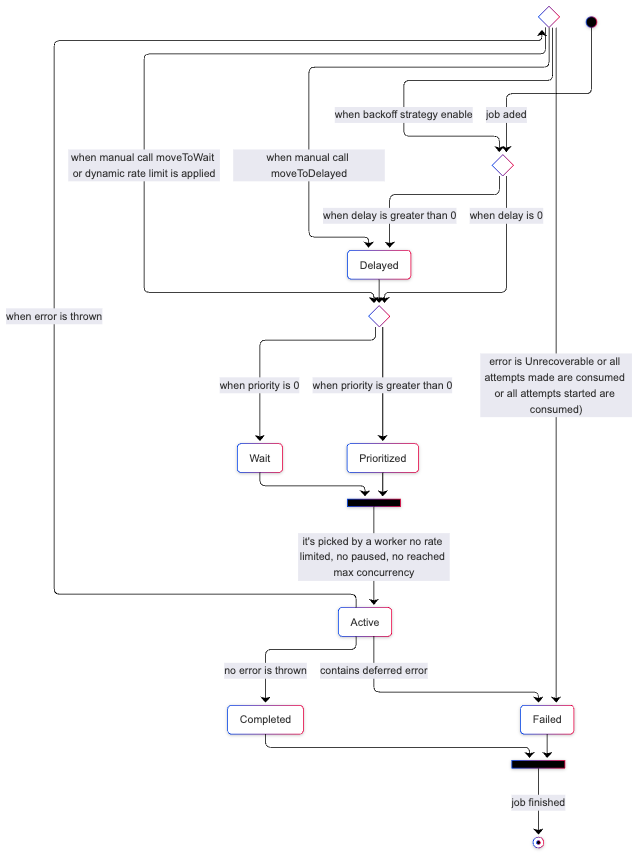
Lifecycle of a job
Job Counts
It is often necessary to know how many jobs are in a given status:
typescript
import { Queue } from 'bullmq';

const myQueue = new Queue('Paint');

const counts = await myQueue.getJobCounts('wait', 'completed', 'failed');

// Returns an object like this { wait: number, completed: number, failed: number }
python
from bullmq import Queue

myQueue = Queue('Paint')

counts = await myQueue.getJobCounts('wait', 'completed', 'failed')

# Returns an object like this { wait: number, completed: number, failed: number }
rust
use bullmq::{Queue, QueueOptions};

let queue = Queue::new("Paint", QueueOptions::default()).await?;

let counts = queue.get_job_counts().await?;
// counts.waiting, counts.completed, counts.failed, counts.active, etc.
println!("waiting: {}, completed: {}, failed: {}", counts.waiting, counts.completed, counts.failed);
The available status are:
- completed,
- failed,
- delayed,
- active,
- wait,
- waiting-children,
- prioritized,
- paused, and
- repeat.
Get Jobs
It is also possible to retrieve the jobs with pagination style semantics. For example:
typescript
const completed = await myQueue.getJobs(['completed'], 0, 99, true);

// returns jobs at indices 0-99 inclusive (100 jobs total)
python
completed = await myQueue.getJobs(['completed'], 0, 99, True)

# returns jobs at indices 0-99 inclusive (100 jobs total)
rust
let completed = queue.get_jobs(&["completed"], 0, 99, true).await?;

// returns jobs at indices 0-99 inclusive (100 jobs total)